TV pixelation is one of the most common issues people notice when watching television through an aerial. Instead of a clear picture, the screen suddenly fills with blocks, frozen frames, or distorted images. Sound may cut out, channels might disappear temporarily, and sometimes the picture will break up every few seconds.
In many homes we visit, people assume the television itself is faulty. In reality, pixelation is usually caused by problems with the digital TV signal rather than the TV hardware. When the signal drops below a certain level, the television cannot reconstruct the image properly, resulting in the familiar square blocks across the screen.
Over the years, while working with aerial installations and signal diagnostics, we regularly encounter the same handful of issues. Weak aerial signals, damaged cables, misaligned aerials, and electrical interference are among the most common culprits. Weather conditions and ageing equipment can also affect signal quality.
Understanding why pixelation happens makes it much easier to identify the correct fix. In many cases, the solution is surprisingly simple, such as tightening a loose cable or repositioning the aerial. In other situations, replacing ageing aerial equipment or improving signal distribution inside the home may be necessary.
What TV Pixelation Actually Is
To understand why TV pixelation happens, it helps to understand how digital television works. Unlike the old analogue television system, modern broadcasting uses digital signals that transmit compressed data rather than continuous video waves.
With analogue television, poor signal quality resulted in a snowy or fuzzy picture. The signal gradually degraded as reception weakened, but the image usually remained visible. Digital television behaves differently. Once the signal drops below a certain threshold, the television struggles to decode the data stream.
When this happens the TV begins to display blocky images, frozen frames, or missing sections of the picture. This is what we refer to as pixelation. Instead of showing static noise, the screen breaks into small squares or blocks while the TV attempts to reconstruct the image.
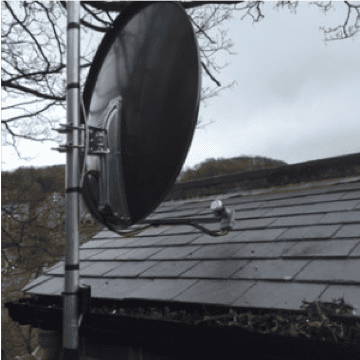
Digital television systems such as Freeview rely on stable signal transmission from broadcast towers known as transmitters. These signals travel through the air and are captured by the aerial mounted on your home. The aerial then sends the signal through a coaxial cable to the television or set-top box.
If anything weakens or disrupts this signal before it reaches the TV, the decoding process becomes unreliable. This leads to picture break-up, freezing channels, or intermittent signal loss. Understanding this signal chain helps explain why aerial problems are responsible for many pixelation issues.
Weak TV Aerial Signal
One of the most frequent causes of TV pixelation is a weak aerial signal. Digital television requires a stable signal strength to maintain picture quality. If the signal drops too low, the TV cannot decode the broadcast properly and the image begins to break up.
Weak signals can happen for several reasons. In many cases the aerial was installed incorrectly or positioned in a location with poor signal reception. Homes surrounded by tall buildings or located in valleys may also experience weaker broadcast signals.
We often find aerials installed too low on the property or positioned behind obstacles such as chimneys or nearby structures. These obstructions can reduce signal strength before it even reaches the aerial.
Another common issue is ageing aerial equipment. Over time aerial elements can corrode, loosen, or become damaged by wind. Even a slight change in the aerial’s position can reduce signal quality enough to cause pixelation.
Weak signals usually produce symptoms such as:
- Picture breaking into blocks
- Channels freezing or disappearing
- Sound cutting in and out
- Intermittent signal loss during viewing
Improving aerial positioning or replacing old aerial equipment often resolves these issues quickly.
Damaged or Poor Quality Aerial Cables
The cable connecting your aerial to the television plays a crucial role in signal quality. Even if the aerial is perfectly positioned, a damaged cable can weaken the signal before it reaches the TV.
Over time coaxial cables can deteriorate due to exposure to weather, sunlight, and temperature changes. Cracked outer insulation allows moisture to enter the cable, which significantly reduces signal quality.
Loose connectors are another common issue we encounter when diagnosing aerial faults. A slightly loose aerial plug or wall socket can interrupt signal transmission, resulting in intermittent pixelation.
Cheap or thin aerial cables can also cause problems. Lower-quality cables often have poor shielding, which allows electrical interference to disrupt the signal. In many older installations we see cables that were never designed for modern digital television signals.
Replacing old or damaged cables can dramatically improve reception. In some homes simply installing high-quality double-screened coaxial cable restores a perfectly clear picture.
Aerial Alignment Problems
TV aerials must point towards the correct transmitter to receive the strongest signal. Even a small misalignment can reduce signal quality enough to cause pixelation.
Storms and strong winds are a common cause of aerial movement. Over time the aerial bracket may loosen slightly, allowing the aerial to shift direction. This small change may not be visible from the ground, but it can significantly affect reception.
In some cases the aerial was never aligned correctly during installation. We occasionally visit homes where the aerial is pointing at the wrong transmitter entirely. While the television may still receive some channels, the signal strength is often too weak for stable viewing.
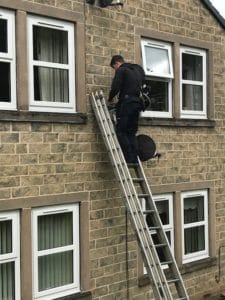
Professional aerial engineers use signal meters to determine the optimal aerial position. These devices measure signal strength and quality while adjusting the aerial direction. Proper alignment ensures the aerial receives the strongest possible signal from the transmitter.
Weather and Environmental Interference
Weather conditions can sometimes affect digital TV signals. Heavy rain, strong winds, and atmospheric pressure changes can all interfere with broadcast signals travelling through the air.
While modern digital systems are generally reliable, extreme weather can weaken signals enough to cause temporary pixelation. High winds may also move the aerial slightly, reducing signal quality until the aerial is repositioned.
Environmental factors can also play a role. Large trees growing near the aerial may block signals, particularly during summer when foliage becomes dense. New buildings constructed nearby can also obstruct signal paths that were previously clear.
Heatwaves occasionally affect signal transmission as well. Changes in atmospheric conditions can cause signal reflections, which interfere with normal signal reception. Although these issues are usually temporary, they can still cause noticeable picture break-up.
Electrical Interference
Electrical interference is another potential cause of TV pixelation. Many modern electronic devices emit electromagnetic signals that can disrupt poorly shielded aerial cables.
Common sources of interference include LED lighting, power supplies, broadband routers, and household appliances. When these devices operate close to aerial cables or distribution equipment, they may introduce signal noise.
We sometimes encounter homes where new lighting installations or electrical equipment have unknowingly caused TV signal problems. Poor cable shielding makes the system more vulnerable to this interference.
Upgrading to better-quality cables and ensuring proper signal distribution can often eliminate these issues.
Faulty Amplifiers or Signal Boosters
Signal amplifiers are often installed to strengthen aerial signals in homes with multiple televisions. However, faulty amplifiers can actually create signal problems rather than solve them.
If an amplifier fails or becomes unstable, it may introduce signal noise into the system. In other situations the amplifier may overload the signal if the incoming signal is already strong.
Digital television systems require balanced signal levels. Too little signal causes pixelation, but excessive signal strength can produce the same symptoms.
Replacing a faulty amplifier or adjusting the signal distribution system usually restores normal reception.
Freeview Transmission Issues
Occasionally the cause of TV pixelation is not inside the home at all. Broadcast transmitters sometimes undergo maintenance or technical adjustments that affect signal availability.
During transmitter engineering work, signal strength may temporarily drop or channels may be unavailable. Frequency changes can also occur during network upgrades, requiring televisions to be retuned.
When diagnosing signal problems we often check transmitter status before investigating aerial equipment. If transmitter work is underway, reception usually returns to normal once the maintenance is complete.
How Aerial Engineers Diagnose Pixelation
Professional aerial engineers follow a systematic approach when diagnosing TV pixelation. The first step is measuring signal strength and quality using specialised equipment.
We typically begin by testing the signal directly at the aerial point. This helps determine whether the problem originates outside or inside the home. If the signal is weak at the aerial, the issue may involve alignment, aerial condition, or transmitter reception.
Next we inspect the entire signal path through the property. This includes checking aerial cables, wall sockets, splitters, and amplifiers. Any faulty components can significantly reduce signal quality.
Once the root cause is identified, the appropriate repair can be carried out. This may involve realigning the aerial, replacing damaged cables, upgrading signal distribution equipment, or installing a new aerial.
How to Fix TV Pixelation Problems
If your television picture is breaking up, there are several simple checks you can perform before calling an engineer.
- Check that all aerial cables are securely connected
- Inspect cables for visible damage or wear
- Retune your television channels
- Ensure the aerial is correctly positioned
- Replace damaged aerial leads or connectors
If these steps do not resolve the issue, the problem may require professional signal testing. Aerial engineers can quickly diagnose the cause and restore stable reception.
When You Should Replace Your TV Aerial
TV aerials are designed to last many years, but they do not last forever. Over time exposure to weather can weaken aerial components and reduce signal performance.
Signs that an aerial may need replacing include frequent signal problems, visible corrosion, and loose aerial elements. If the aerial is more than ten to fifteen years old, replacing it with a modern digital aerial can often improve reception dramatically.
New aerial designs are more efficient and better suited to modern digital broadcasting systems. Upgrading old equipment often eliminates long-standing signal problems.
Our Final Say!
TV pixelation can be frustrating, especially when it interrupts your favourite programmes. Fortunately, the cause is usually straightforward once the signal system is properly inspected.
Weak aerial signals, damaged cables, misaligned aerials, and electrical interference are responsible for most pixelation issues we encounter. Weather conditions and ageing equipment can also contribute to signal instability.
By checking cables, ensuring the aerial is correctly positioned, and maintaining good signal distribution throughout the home, many of these problems can be avoided. When the issue proves more complex, professional aerial engineers can quickly diagnose and fix the underlying cause.
In most situations, restoring a strong and stable signal will eliminate pixelation completely and return your television picture to perfect clarity.